

Colors and color schemes
Edit Kera's four color schemes, pick a scheme per section, and set the sale price and stock message colors.
A color scheme sets a background, text, buttons and details. Each section picks one, so editing a scheme changes every section using it.
Set it up#
- Open Theme settings > Colors and click a scheme.
- Change its colors.
- To give a section another scheme, select it and change its Color scheme.
- Click Save.
Do it with Sidekick
Open Sidekick in the theme editor and paste this, with your own names. Check the preview, then click Save.
In Theme settings > Colors, change scheme 4's background to #1F3A2E and its text to white, and keep its buttons readable on that background.
Settings#
The schemes the theme installs with
The same section in each scheme:
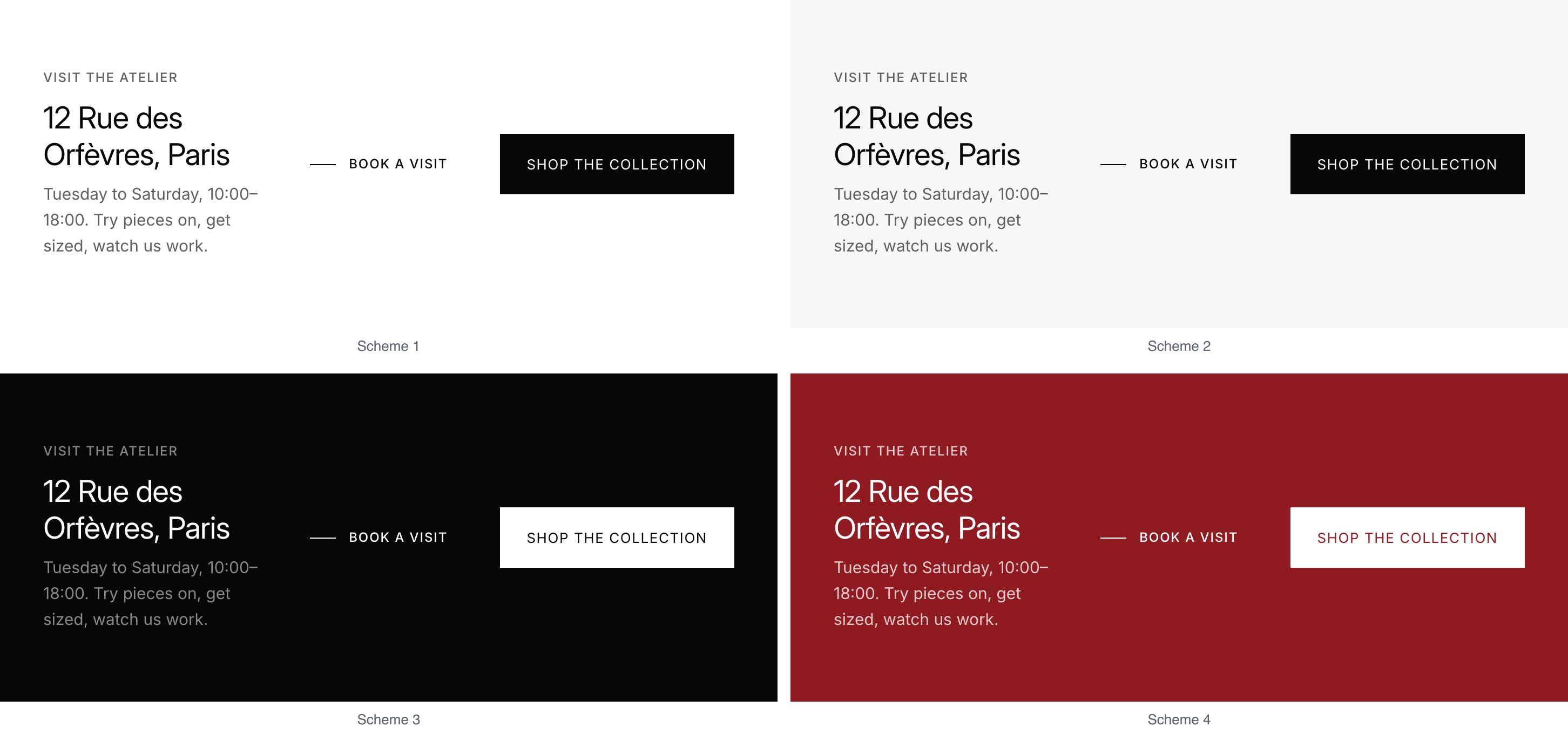
| Scheme | Background | Text | Used on install by |
|---|---|---|---|
| Scheme 1 | White #FFFFFF |
Near black #070708 |
Most sections, header, drawers |
| Scheme 2 | Light grey #F7F7F7 |
Near black #070708 |
Softer bands, such as Icons with text |
| Scheme 3 | Near black #070708 |
White #FFFFFF |
The footer, the home page's Collection showcase, the newsletter popup's teaser |
| Scheme 4 | Deep red #8E1B22 |
White #FFFFFF |
The announcement bar |
Edit these four or add more.
In each scheme
| Setting | What it does |
|---|---|
| Background | The section's background. |
| Text | Body text and headings. |
| Muted text | Captions, helper text and secondary labels. |
| Borders and dividers | Lines between items, and field outlines. |
| Links | Link color. |
| Icons | Icon color. |
| Accent | Sale prices when Sale price is empty, and small details such as discounts on order pages. |
Primary button has Background, Label and Border, for Add to bag and other main buttons. Secondary button has Label and Border; its background is the scheme's own. Hover and pressed shades are worked out from the button color.
Prices and messages
| Setting | What it does |
|---|---|
| Sale price | The color of sale prices everywhere. Leave it empty to use each scheme's Accent. |
| Success | In stock, applied discounts and sent forms. Default #15803D. |
| Warning | Low stock. Default #B45309. |
| Error | Sold out and form errors. Default #DC2626. |
Good to know#
Why does a message color look different on a dark scheme?
Where it would be hard to read, the theme shifts it toward the scheme's text color until it's readable. Field outlines are adjusted the same way.
Which colors don't come from the schemes?
Badges have their own colors in Theme settings > Badges, and the quick add + button in Theme settings > Quick add. The shade behind an open drawer is in Theme settings > Drawers and overlays.