

Add promo cards between products
Place image or video promo cards inside the collection grid, on every collection or only on the ones you choose.
Promo cards sit in the collection grid between products, with an image or a muted looping video, text and a button. Use them for an edit, a gift guide or an offer.
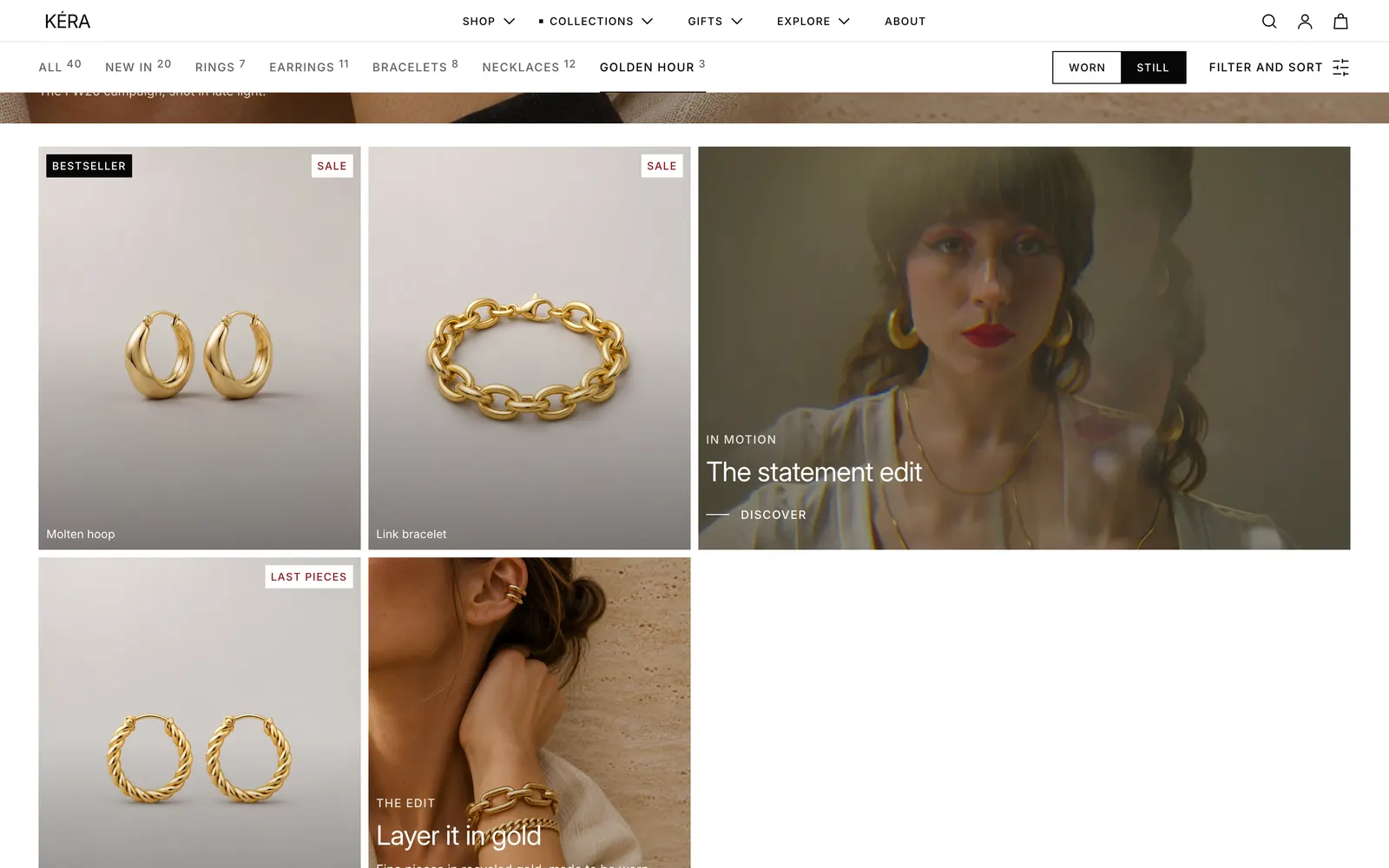
Set it up#
- Select the Collection section, click Add block and choose Promo image card or Promo video card (up to 6). The default template has one of each, at positions 3 and 7.
- Set Position in grid: the card goes before that product.
- Set Width on desktop and Width on mobile.
- Add the Image or Video, then the Heading, Button label and Link.
- To limit the card, pick collections in Show on collections. Empty shows it on every collection.
Settings#
Promo card settings
Both blocks share these settings, except the media ones noted.
| Setting | What it does |
|---|---|
| Show on collections | The collections the card shows on. Empty shows it on every collection. |
| Position in grid | The product the card goes before. 1 to 24, default 3. With fewer products, the card goes at the end. |
| Width on desktop | 1 column or 2 columns (default). |
| Width on mobile | 1 column or Full width (default). |
| Image | Promo image card only. The card's image. |
| Mobile image | Promo image card only. Shown on phones instead. |
| Video | Promo video card only. Plays muted on a loop. |
| Mobile video | Promo video card only. Played on phones instead. |
| Overlay opacity | Darkens the media behind the text. 0 to 60%, default 20%. |
| Text on media | Light (default) or Dark. |
| Color scheme | Used as the background when the card has no media. Default scheme 2. |
| Eyebrow | Small text above the heading. Default "The edit". |
| Heading | The card's heading. |
| Heading size | Heading 4, Heading 3 (default) or Heading 2. |
| Text | A short paragraph. |
| Button label | The button's text. Default "Discover". |
| Link | Where the card goes. Without a button label, the whole card links here. |
| Content position | Top left, Bottom left (default), Center or Bottom center. |
Every setting: Collection reference.
Good to know#
Why doesn't my promo card show?
Check that you're on the first page of the collection, that the card has an image, video or heading (a card with neither shows nothing), and that Show on collections is empty or includes this collection.
How do cards affect the rows?
Cards take grid space, so a 2-column card in a 4-column grid fills half a row. After placing a card, preview the page on desktop and on a phone to check the rows.
Can I show a promo only on an editorial collection?
Yes. Add it to the Collection section in that collection's template, or keep it in the default template and pick the collection in Show on collections. See Editorial collections.