

Set up the free shipping bar and free gift
Show shoppers how far they are from free shipping and a free gift, let them pick the gift in the bag, and set up the shipping rate and discount that make both free.
One progress bar in the bag with up to two goals: free shipping and a free gift. At the gift goal, a picker appears and the shopper chooses one gift.
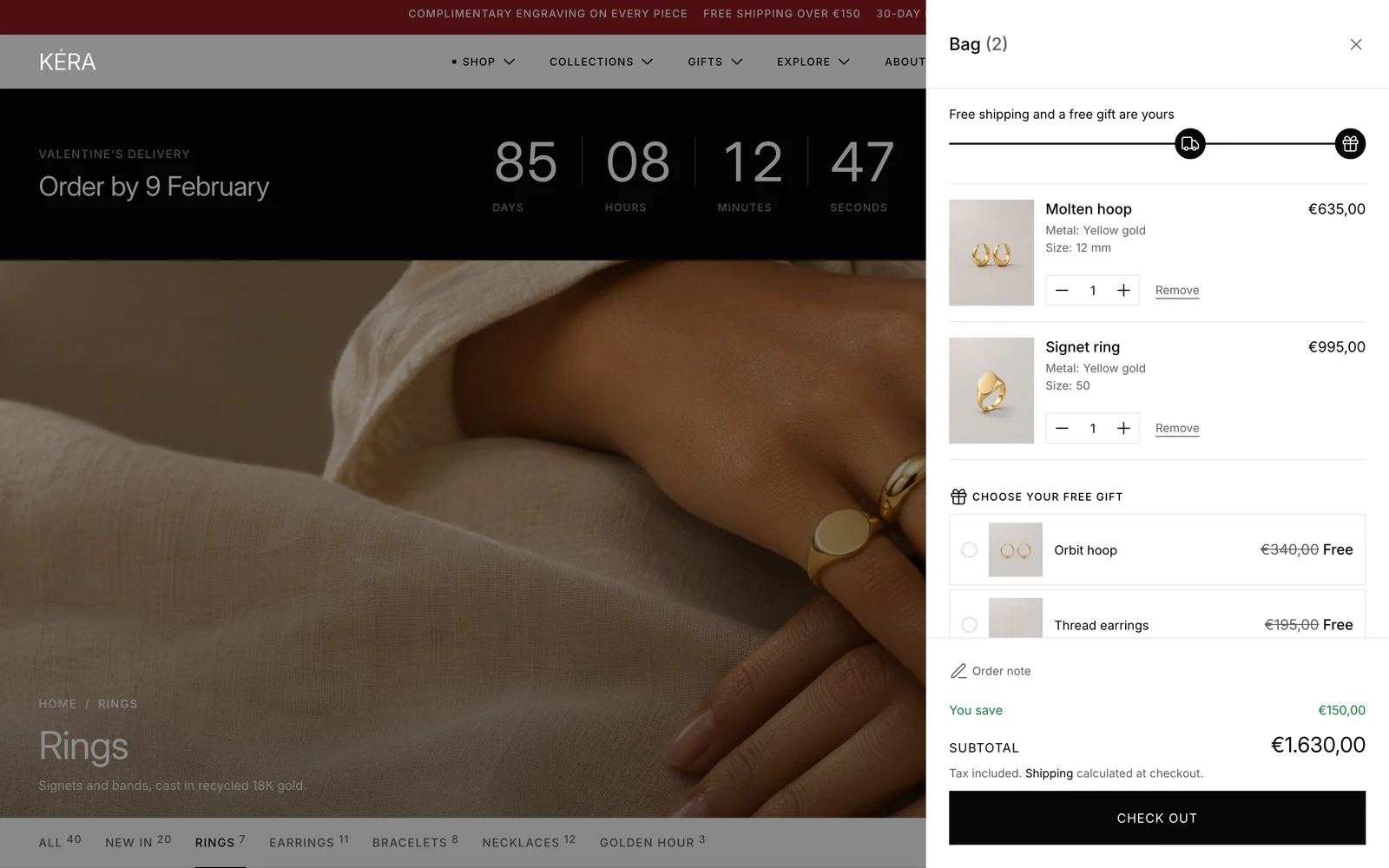
Set it up#
- Create a collection holding only the gift products, for example "Gift with purchase".
- In Theme settings > Cart, turn on Show progress bar and set Free shipping from.
- Turn on Free gift over an amount, choose the Gift collection and set Free gift from.
Create the rate and the discount#
- In Settings > Shipping and delivery (opens Shopify admin in a new tab), add a free rate based on order price, with the same minimum as Free shipping from.
- In Discounts > Create discount (opens Shopify admin in a new tab), choose Buy X get Y and Automatic discount.
- Under Customer buys, choose Minimum purchase amount: the same amount as Free gift from.
- Under Customer gets, set quantity 1 from your gift collection, Free, with a maximum of 1 use per order. Save.
Do it with Sidekick
Open Sidekick in the Shopify admin and paste this, with your own names and numbers. Check what it fills in before you save.
Create a manual collection called "Gift with purchase" with only the product "Pearl studs".
Create an automatic Buy X get Y discount: when the order subtotal is €150 or more, the customer gets 1 product from the "Gift with purchase" collection free, at most once per order.
Walk me through adding a free shipping rate for orders of €150 or more in Shipping and delivery.
Settings#
Theme settings > Cart
| Setting | What it does |
|---|---|
| Show progress bar | Shows the distance to free shipping and the free gift. Installs off. |
| Free shipping from | The free shipping goal, in store currency. Default 150. |
| Free gift over an amount | Turns on the free gift. Installs off. It shows nothing until a Gift collection with products is chosen. |
| Gift collection | Its first 4 products, in the collection's sort order, show in the gift picker. Sold-out gifts are left out. |
| Free gift from | The gift goal, in store currency. Default 250. |
Free gift block
| Setting | What it does |
|---|---|
| Heading | The picker's title. Empty shows "Choose your free gift", then "Your free gift" once a gift is in the bag. |
Good to know#
How does the bar count?
It shows the distance to free shipping ("You're €40 away from free shipping"), then to the gift, with an icon for each goal. It counts line prices after discounts, without the gift line.
How does the gift picker behave?
The shopper taps a gift to add it, or another to swap; the theme never adds one on its own. The gift shows its price crossed out and "Free", with no quantity control. The theme keeps one gift at quantity 1 and removes it if the bag drops below the goal. The picker comes from the Free gift block, installed in the Cart drawer (Overlays) and the Cart section; without it, the bar leaves out the gift goal.
Which products should count toward the discount?
Under Customer buys > Any items from, choose what counts, and leave the gift products out so Shopify counts the same amount as the bag. Keep gift products out of your other collections and hide them from search (see Metafields). Then test in your store's preview: fill the bag to the goal, pick a gift, and check it's free at checkout.
The bar doesn't show for some shoppers.
The bag is empty, or the shopper pays in another currency: the goals are in your store currency and apply only there. For other markets, add Decimal definitions custom.free_shipping_threshold and custom.free_gift_threshold in Settings > Metafields and metaobjects > Markets (opens Shopify admin in a new tab), fill them in per market in its currency, and match its shipping rate and discount. They override the theme settings, which must still be turned on.
Can I show only the free gift, without free shipping?
Yes. Set Free shipping from to 0 and turn on Show progress bar; the bar then shows the gift goal only. With Show progress bar off, the picker still appears at Free gift from.